


IMVU: Social Chat & Avatar app
4.5117.06K Reviews
App Specs
- Version
- 14.10.2.141002001
- Updated On
- License
- Free
- Downloads
- 50,000,000+
- Developer
- IMVU, Inc.
- Categories
- Social
- Platform
- Android, iOS
Screenshots





 Analysis by AppCompare
I tend to think of IMVU: Social Chat & Avatar as a place to spend time in character rather than another feed to scroll. Its appeal is the combination of a customizable 3D avatar, chat spaces and a virtual marketplace. That mix makes it a distinctive social app, but it also means the first visit can feel busier than opening a straightforward messaging service. I’d give it a little time to find your footing instead of expecting every part to make sense immediately.
Getting Comfortable in a 3D Social Space
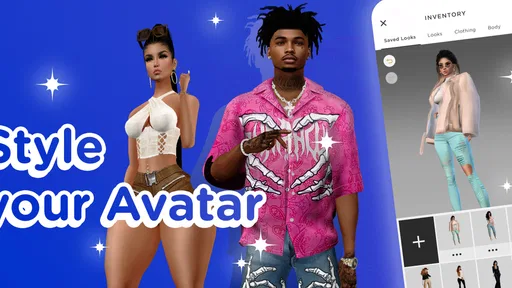
When I installed IMVU: Social Chat & Avatar, I was immediately struck by the 3D aspect of it. Unlike other social apps that are all about text and flat images, IMVU lets you create an avatar—a virtual version of yourself that can look however you want. Fancy pink hair and a unicorn onesie? Go for it! The app gives you tons of options to customize your look, which is perfect if you love mixing things up.
Make an Avatar Before You Rush Into Chat
The avatar creation process is super intuitive. You get to choose everything from skin tone to eye color, and the wardrobe options are pretty extensive. I spent a good half-hour just tweaking my avatar to make sure it perfectly reflected my quirky style. And here's the kicker: as you explore the app, you earn more credits to unlock additional customization options. It’s like a never-ending fashion show!
Guides and Analysis on IMVU: Social Chat & Avatar app
One practical choice is to treat your first look as a starting point, not a final commitment. You can get into the social side without spending ages perfecting every detail, then return to styling once you know what sort of rooms and conversations you enjoy. That avoids turning setup into a shopping decision before you have a feel for the app. If browsing items is part of the fun for you, take it slowly and distinguish between experimenting with available options and deciding to buy anything.
Finding the Right Kind of Conversation
Once my avatar was ready, it was time to jump into the social aspect of the app. IMVU is essentially a social network but with a 3D twist. You can join chat rooms, attend virtual events, and even host your own gatherings. I joined a few public chat rooms and was pleasantly surprised by how welcoming the community is. It’s a refreshing change from some of the more intense social media platforms out there.
The conversations range from casual chit-chat to more involved discussions on hobbies and interests. And because it's all in a virtual space, you get to see other people's avatars, which adds a layer of fun and creativity to the interaction. It’s like hanging out in a virtual café or a beach party without leaving your couch.
For a low-pressure first session, I’d browse a room before deciding to participate, then try a brief greeting or a question related to the room’s topic. That gives you a chance to see whether the pace and atmosphere suit you without feeling obliged to stay. A 3D setting can make a chat feel more like a shared hangout than a comment thread, but it doesn’t guarantee every room will be your kind of place. If one feels awkward or quiet, trying a different topic is more useful than assuming the whole app is a mismatch.
Worth Reading Before You Choose

Ludo King Makes the Most of the Minutes Between Plans

Baby Panda World Brings Quick Play to Modern Phones, but Its Game Library Feels Busy

ESPN’s Live Game View Makes Following Close Games Easier

QuizzLand Review: A Good Fit for Short Trivia Breaks, Not Every Player

Basketball Stars: Multiplayer Is Fast, but Can It Recover When Matches Go Wrong?

WEBTOON Turns Phone Updates Into a Better Reading Routine
Browsing the Marketplace Without Losing Your Bearings
One of the features that really stood out to me was the IMVU Marketplace. It’s a treasure trove of items created by other users, ranging from clothing and accessories to furniture and even animations. It’s like Etsy but in a virtual world. I found myself browsing for hours, discovering all sorts of unique items to jazz up my avatar and virtual spaces.
The marketplace operates on a credit system, which you can earn through various activities in the app or purchase. It’s a neat way to support other creators while enhancing your own experience. Plus, the variety is insane—there's always something new to catch your eye.
My advice is to browse with a specific idea in mind—perhaps a color, style or item for your avatar—rather than treating the marketplace as an endless catalogue. Save any purchase decision until you have checked the item’s details and understand what you want to use it for. That small pause helps keep creative browsing enjoyable instead of making credits the main event. The trade-off is clear: the marketplace adds personality and choice, but people who want a social app with no virtual shopping element may find it distracting.
Setup and Everyday Troubleshooting
Now, let’s talk tech. IMVU is available on both Android and iOS, which means you can take your virtual life on the go. The app runs smoothly and I didn’t encounter any major glitches. The interface is clean and user-friendly, making it easy to navigate even if you’re a newbie to virtual worlds.
However, a word of caution: the app can be a bit of a data hog, so make sure you're connected to Wi-Fi if you’re planning a long session. Also, because it's so visually rich, it’s not the kind of app you want to run on a five-year-old phone.
If a room or item takes longer than expected to appear, I’d first check whether the connection is stable, especially if I’m away from Wi-Fi. Then I’d give the screen a moment, move back to the previous view and try again before restarting the app. For a sluggish session, closing other demanding apps and checking that the device has enough free space are sensible general steps; they won’t fix every issue, but they help separate a temporary device slowdown from a problem with the service.
Before installing, it’s also worth checking that your device meets the minimum operating-system requirement: version 10. The current release is 14.3.0.140300001. If installation or an update stalls, I’d confirm the connection and available storage, then check the app store for the latest version rather than repeatedly tapping the install button. If the same problem continues after those basic checks, using the app store’s normal support route is more appropriate than assuming a particular in-app setting is responsible.
IMVU is free to download, with in-app purchases ranging from $0.49 to $199.99 per item. That is a wide span, so I’d treat optional spending carefully, particularly if you are still learning what the credits and marketplace mean for your own use. You can start by seeing how much you enjoy chatting and styling with what is already available. The app is rated Teen, which is a useful reminder for families to consider whether avatar-based social interaction and conversations with other users are appropriate for the young person using it.
Where It Fits Among Social Apps
Compared with a typical messaging app, IMVU asks you to do more than exchange text: you build a visible persona and meet people in shared virtual spaces. Compared with a conventional social feed, the emphasis feels less like posting updates for people you already know and more like choosing a room and joining a live social setting. That difference is its strongest reason to try it, but also why it will not replace a direct, practical chat tool for everyone.
I’d recommend it to someone who enjoys avatar styling, playful conversation and exploring community spaces at their own pace. It is less suitable if you mainly want to message close friends quickly, avoid spending decisions, or prefer social platforms with minimal visual activity. People who feel drained by meeting strangers may also prefer a familiar group chat; IMVU’s most distinctive parts work best when you actually want to explore beyond one-to-one messages.
My Take on the Experience
All in all, IMVU: Social Chat & Avatar is a blast if you're looking for a unique way to socialize and express yourself creatively. It's a mix of social networking, gaming, and creativity all rolled into one. Whether you're into fashion, art, or just meeting new people, there's something here for everyone.
I found myself returning to the app whenever I had a spare moment, eager to see what new things I could discover. If you’re curious and ready to dive into a 3D world of fun, give IMVU a whirl. Who knows? You might just find your new favorite hangout spot.
For a realistic everyday use, I can see opening it after dinner, changing one small detail on my avatar, then visiting a room for a short conversation before putting the phone away. That is a more manageable way to explore than trying to master every section in one sitting. If I wanted a quick plan with friends, I’d use a regular messenger instead; if I wanted a creative social space and did not mind taking time to browse, this is where IMVU makes more sense.
IMVU, Inc. has built an app with a clear personality: avatars and virtual spaces are not just decoration around a standard feed, but the core of how people present themselves and interact. Its 4.5 average rating, drawn from around 701,000 ratings, suggests broad appeal, while its more than 10 million installs show that many people have tried it. Those figures don’t tell me whether a particular room will suit me, so I’d judge it by the conversations and creative options I actually find.
My practical verdict is to try it if you want socializing to feel imaginative and have patience for a visually rich app. Start with a simple avatar, explore one room, and keep marketplace browsing separate from any decision to spend. If you are after a quiet, direct way to keep up with people you already know, choose a standard messaging app. If you want a more expressive virtual hangout, IMVU is worth exploring—just at your own pace.
Pros
- Vibrant 3D avatar customization options.
- Diverse virtual world environments.
- Strong community engagement features.
- Regular updates with new content.
- Cross-platform availability for users.
Cons
- In-app purchases can be pricey.
- Occasional app performance issues.
- Chat moderation could be improved.
- Requires stable internet connection.
- Some features locked behind paywall.
FAQs for IMVU: Social Chat & Avatar app
What is IMVU and how does it work?
IMVU is a social networking app where users can create 3D avatars to interact with others in a virtual world. Users can customize their avatars, explore different environments, and engage in chats with other users. The app combines elements of social media with immersive, virtual experiences, allowing for creative self-expression and social interaction.
Is IMVU free to use, and what features require payment?
IMVU is free to download and use, offering basic features like avatar creation and chat. However, many customization options for avatars, such as clothing and accessories, require in-app purchases using virtual currency called "Credits." Users can earn or purchase Credits to enhance their experience, but the core functionalities remain accessible without payment.
How safe is IMVU for younger users?
IMVU has safety measures in place, including content moderation and privacy settings. Users must be at least 13 years old, and parental controls can restrict content for younger users. However, as with any online community, it’s important for parents to monitor activity and educate their children about internet safety and appropriate online behavior.
Can I use IMVU on multiple devices?
Yes, IMVU can be accessed on multiple devices, including Android, iOS, and desktop platforms. Users can log in with the same account across different devices, allowing for a seamless experience. This cross-platform accessibility enables users to continue their virtual interactions and maintain their avatar’s appearance and inventory wherever they are.
What can I do if I encounter technical issues with IMVU?
If technical issues arise while using IMVU, the app offers a support page with solutions to common problems. Users can also contact customer support directly through the app or website for assistance. Regular updates are provided to fix bugs and improve performance, so ensuring the app is updated can help mitigate issues.


